
Spotlight

Missing Link

Manage your site’s content from the frontend.

Switchboard

Control panel search & navigation made easy.

EE2 Addons

VayaCode

QuickSave

for ExpressionEngine 2

QuickSave is an EE2 extension that replicates the EE1 entry quick save feature. When enabled, this extension will bypass the standard EE entry preview page altogether, opting instead to return the user to the entry that they were editing. You can also optionally add 'Save & Close' and 'Save & Preview' submit buttons to the publish page.

Usage

Setting up QuickSave

  • Ensure you have extensions enabled.
  • Upload the quicksave folder to /system/expressionengine/third_party/.
  • Enable QuickSave via Add-Ons > Extensions.

Extra Buttons

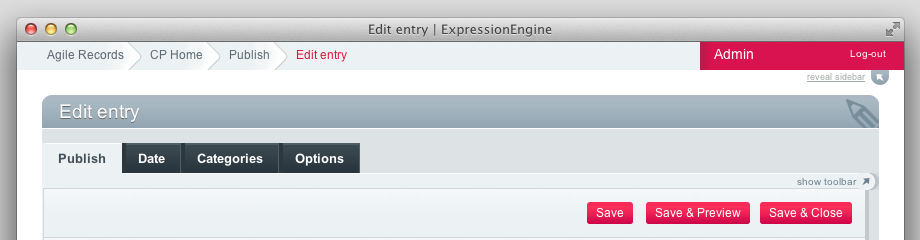
As well as modifying the behaviour of the standard submit button you can use this extension to add a ‘Save & Close’ button, which returns you to the Edit Entries listing, and a ‘Save & Preview’ button, which takes you to the standard entry preview page.

Extra buttons screengrab

You can enable one or both of the extra buttons via the QuickSave extension settings. These buttons will only appear if you’re using EE 2.1.2 or newer, as prior releases do not include the cp_js_end hook.

To minimise clutter you can also opt to remove the ‘Save Revision’ button – a revision will still be saved when the entry is updated via other buttons.

Structure Support

Structure users can specify whether the Save & Close button returns to the Edit Entries listing or the Structure module homepage.

This addon is released under the Creative Commons Attribution-No Derivative Works license.

Download